Fail2Ban on NixOS
Fail2Ban allows you to easily temp ban ips if they do a certain action, like visiting a specific path, sending too many requests etc. This helps you protect your server from random crawlers trying to find vulnerable servers and just list your server at all. Although the best thing is still to have a server thats up to date and hardened, its still not bad to also just block malicious ips.
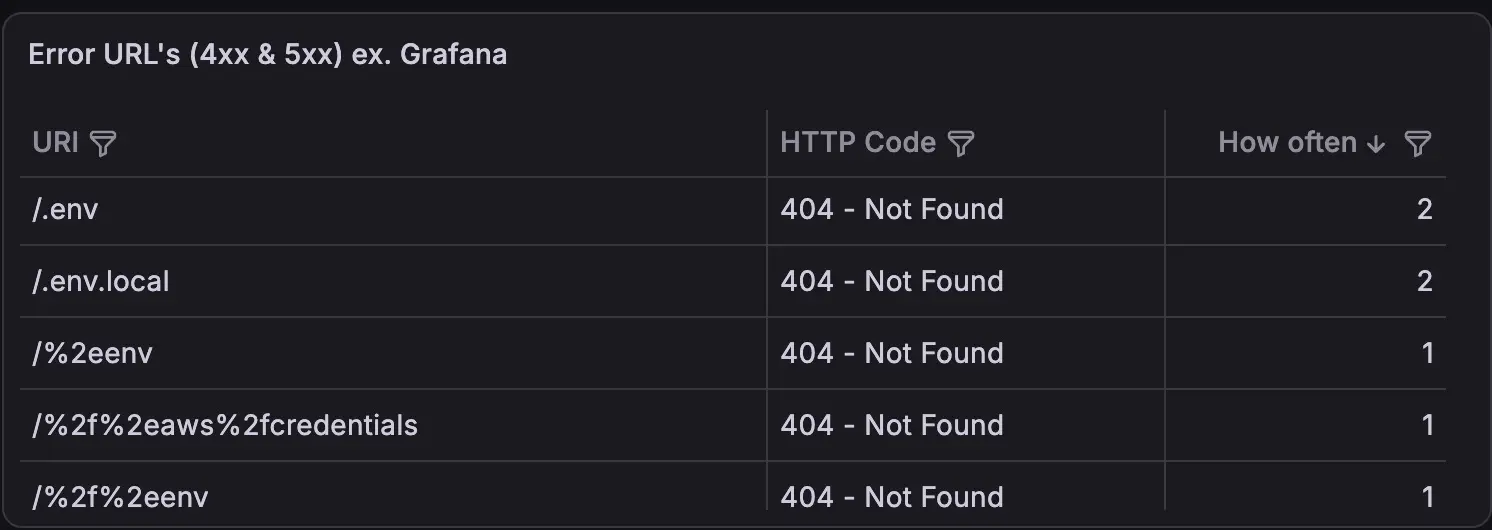
One example for this is if someone is visiting on your blog catinashell.de/.env, I don’t have a .env file, and I never linked on it. These type of files often contain some secrets, which here apparently some opportunistic bot tried to find, and on hit probably report to the script kiddie running these bots, so they can try stealing some random API Keys.
#Getting started
This is just a pretty default fail2ban config for nixos, shipping with the build in ssh jail, using the defaults we se, so if someone fails to connect via ssh 5 times, they get banned for 24h now, after that if they fail again, double that etc. etc.
The only thing to note here is the vars, which isn’t the default, if you want you can just remove the import and just write your public ip (of the server (and if you have a static one of yourself)) there. This prevents the server from getting itself banned lol, which would be really stupid and might happen if you have e.g. sth misconfigured or so
{ vars, ... }:

{
  services.fail2ban = {
    enable = true;

    # IPs that can never be banned
    ignoreIP = [
      "127.0.0.1/8"
      "::1"
      vars.publicIP
    ];

    # defaults
    maxretry = 5;
    bantime = "24h";

    bantime-increment = {
      enable = true;
      multipliers = "1 2 4 8 16 32 64";
      maxtime = "168h"; # never ban an ip for more than 1 week
      overalljails = true;
    };
  };
}#First Custom Jail - Ban Dirbusts
So lets add our first jail now. Dirbusts are basically just some scanners probing if certain files / directories exist on the server or not, and usually they aren’t gentle but just scan as fast as possible, like trying out 1000 paths in 1min or so. Tools that do this are like gobuster, ffuf etc.
And that gives them aways pretty easily, like you can just say, if some ip get’s X 404’s in 1 or 2min -> ban, since this is certainly not a human using your website.
{ vars, ... }:
{
  ... # stuff from above

  services.fail2ban.jails = {
    caddy-dirbust.settings = {
      filter = "caddy-dirbust";
      backend = "auto";
      logpath = "/var/log/caddy/access-*.log";
      maxretry = 30;
      findtime = "2m";
      bantime = "1d";
    };
  };

  environment.etc = {
    "fail2ban/filter.d/caddy-dirbust.conf".text = ''
      [Definition]
      datepattern = "ts":\s*(\d+(?:\.\d+)?)
      failregex = ^.*"remote_ip":"<HOST>".*"status":404.*$
      ignoreregex = ^.*"uri":"[^"]*(?:/favicon\.ico|/favicon-.*\.png|/apple-touch-icon.*|/browserconfig\.xml|/mstile-.*|/manifest\.json|/site\.webmanifest|/robots\.txt|/sitemap\.xml|/\.well-known/(?:acme-challenge|security\.txt|apple-app-site-association|assetlinks\.json|apple-developer-merchantid-domain-association))[^"]*".*$
    '';
  };
}
This means effectivly, that if we get 30 hits in 2m, we ban the ip for 1d. And below is the definition of the filter. This will read the caddy logs and then match them with the failregex, so all 404 errors will be matched and counted, if too many accumulate -> ban.
Also notice the ignoreregex, this excludes some of these results from being counted, like missing resources that browsers might just request on default, acme stuff etc. These might often be legit requests, so don’t ban them.
Also you might need to adjust these filters, like my site gets super rarely 404’s that are legitime since I often check the error logs to see what gets hit often and then add it if it’s valid. If you don’t do this and clients fetch an article with lets say 20 images that are missing, they will get instantly 20 requests counted to them -> on the second reload of the article they are banned basically. So you might consider excluding .webp, .jpg, .png etc. from this as well via the ignoreregex, if you have stuff on your website with broken resources.
#Jail against the opportunistic Credential Crawlers
Now we have a jail against the aggressive bots, that try to enumerate your site, but still we want one as well against bots probing for certain paths, like .env, .git/* etc. etc.
For this I wrote a small abstraction function that builds be the regex automatically just based on 3 lists I give it, these lists contain:
- prefixes in uris that should result in a ban: e.g.
.git/ - exact matches that should result in a ban: e.g.
.env - suffiexes in uris that should result in a ban: e.g.
.DS_Store
all of these requests are basically always malicious, like in my forgejo instance, the pathes don’t start with .git/, or .env, even if I have a .env file I wanna share in any of my repos, it would not be at the root of the uri, but instead at the end, so it should always be banned. And there are bunch more of such requests, that can be easily identified as malicious.
So here is the rule:
{
  vars,
  lib,
  ...
}:

let
  exactBans = [
    ".env"
    "secrets.yml"
    "credentials"
    "phpinfo.php"
    "wp-login.php"
    "xmlrpc.php"
  ];

  prefixBans = [
    ".git/"
    ".ssh/"
    ".config/"
    ".aws/"
    ".svn/"
    "vendor/"
  ];

  suffixBans = [
    ".DS_Store"
  ];

  uriBanRegex =
    let
      parts = map (p: ''/${lib.escapeRegex p}"'') exactBans ++ map (p: ''/${lib.escapeRegex p}[^"]*'') prefixBans ++ map (p: ''[^"]*${lib.escapeRegex p}"'') suffixBans;
    in
      "(?:${lib.concatStringsSep "|" parts})";
in

{
  services.fail2ban.jails = {
    caddy-dirbust.settings = ...  # caddy dirbust part like shown above

    caddy-probes.settings = {
      filter = "caddy-probes";
      backend = "auto";
      logpath = "/var/log/caddy/access-*.log";
      maxretry = 1;
      bantime = "1d";
    };

  };

  environment.etc = {
    "fail2ban/filter.d/caddy-dirbust.conf".text = ... # already shown above

    "fail2ban/filter.d/caddy-probes.conf".text = ''
      [Definition]
      datepattern = "ts":\s*(\d+(?:\.\d+)?)
      # generated from the exactBans/prefixBans/suffixBans lists above
      failregex = ^.*"remote_ip":"<HOST>".*"uri":"${uriBanRegex}.*$
      ignoreregex =
    '';
  };
}
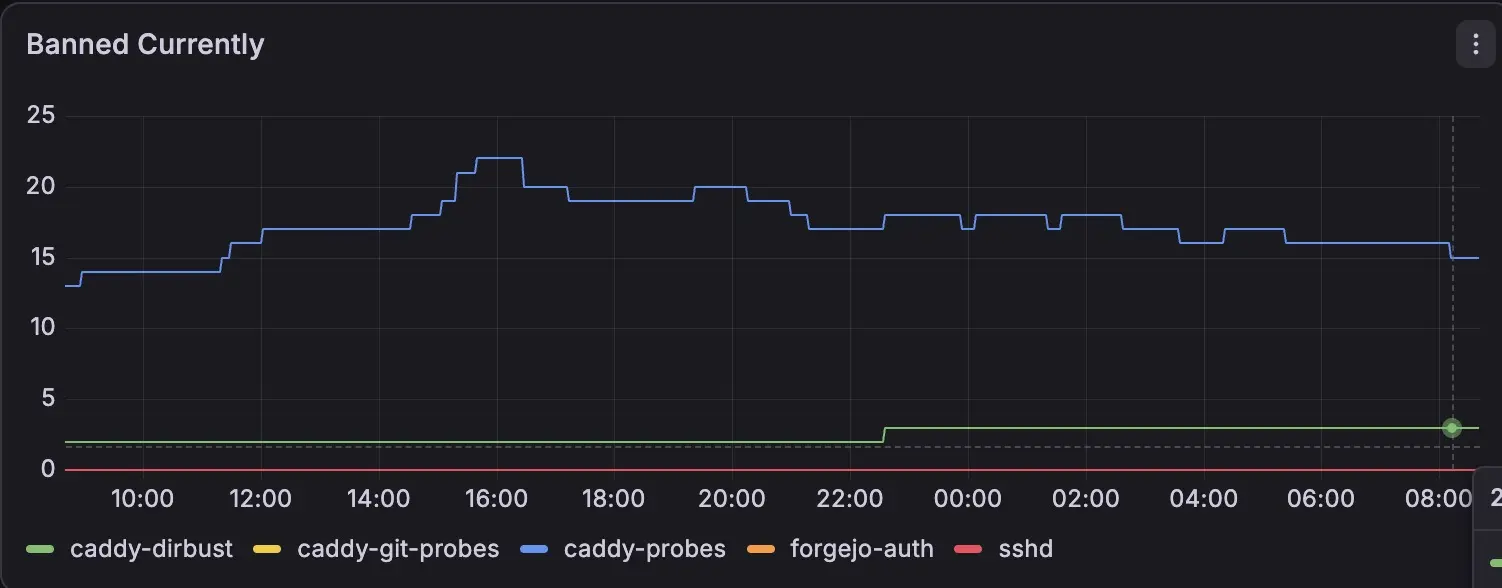
obviously you can add more paths here etc. I recommend you just go through your caddy logs and search for the most requests 404’s, check if they are missing or malicious, and depending on this add them or not to this list. Also it should provide you with a lot of flexibility without having to write regex stuff yourself.
#Further Ideas
You can fail2ban also configure to ban like too many forgejo auth attempts which is quite useful
Or you can, if you have a site bots / crawlers shouldn’t access (so first configure a proper robots.txt, to not ban accidently normal crawlers) where you ban on e.g. accessing the sitemap.xml or other things humans ususally wouldn’t.
Basically like well behaved bot reads robots -> they leave, if they ignore it -> ban. Or even adding some links that humans wouldnt click / even see but bots enumerate.
Also you can use fail2ban to block portscanning attempts on your server, like if someone is testing 100+ ports in 1m -> ban, as this is almost certainly malicious.
nix linux security nixos fail2ban firewall caddy
1140 Words
2026-09-14 23:30 (Last updated: 2026-09-23 16:27)
b77107b @ 2026-09-23